Reviving the WHY2025 Badge, part 1: Firmware Port, Bluetooth & the LED Matrix
Series
The WHY2025 camp might be over, but that doesn't mean you should let the badge collect dust.
Recently I picked the WHY2025 badge back up to learn more about programming small operating systems on embedded chips and to push the onboard ESP32-P4 (the application CPU) and ESP32-C6 (the WiFi/BLE radio) to their limits. Everything here is a continuation on the already existing BadgeVMS firmware written by Team:Badge. On top of their work I upgraded the firmware build version and added a lot of new features like Bluetooth Low Energy support, badge hostnames, badge boot animations, a global autorotate (instead of only in the nametag), a LED-matrix driver, a set of console emulators and a badge-to-badge OTA update system.
This first part of this series covers getting the firmware onto a newer build, some of the bugs, and the quality-of-life/two main features that I thought would be useful to build into the foundation first. The sourcecode and some additional documentation for my customized build can be found here: github.com/Tonemon/BadgeVMS. Flashing can be done the same way as if you would flash the original repository.
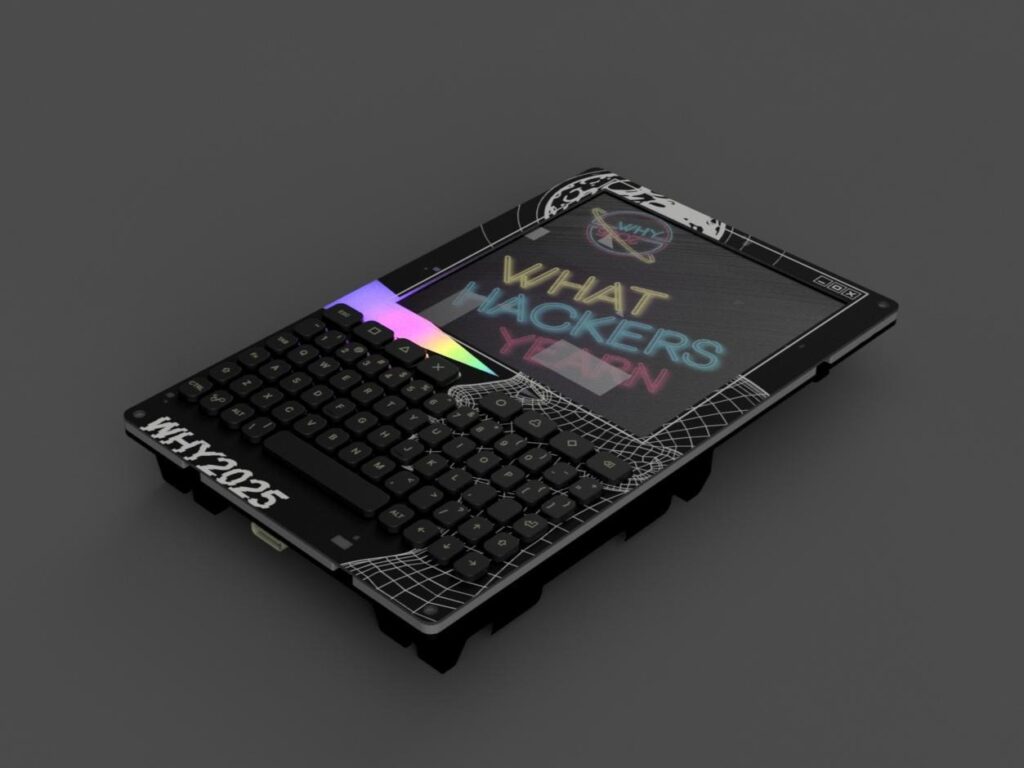
About the Badge and firmware
I won't explain every little detail about the badge itself as there already is a useful official post and Tweakers article about it. However, some interesting things to mention are:
- Two chips on one badge. The ESP32-P4 runs the OS and the apps, while the ESP32-C6 is a coprocessor running an
esp-hostedslave that provides WiFi (and after this work also BLE). The display is a 720×720 ST7703 MIPI-DSI panel at 60 Hz, RGB565. - 32 MB of PSRAM, carved up into a kernel heap, a 25 MB framebuffer heap, and per-process virtual address space. Each process gets its own isolated virtual address space.
- Apps are position-independent ELF shared objects for 32-bit RISC-V (
rv32imafc), entry pointmain, all other symbols hidden, statically linked, nodlopen. The kernel's ELF loader resolves their symbols against the firmware's own export table at runtime. - VMS-style paths, which are not like Unix. Files look like
FLASH0:[BADGEVMS.APPS]hello.elf, with logical-name aliases likeAPPS:that resolve to SD first, then flash. Unix paths like/won't work in this system.
First: Upgrading the build from IDF 5.5.0 to 5.5.4
The original badge firmware was built with ESP-IDF 5.5.0 and only ever shipped as a Docker image, since there's no git tag for 5.5.0 (5.5.1 is the first tagged release). I wanted to develop against a current toolchain, which meant moving to ESP-IDF 5.5.4, which turned out to be its own adventure.
The two versions are incompatible at the source level. Somewhere between them, Espressif split the ESP32-P4 eFuse field wafer_version_major (2-bit) into wafer_version_major_lo and wafer_version_major_hi (3 bits total). The original firmware's HAL override in components/hal/esp32p4/include/hal/efuse_ll.h still references the old name, so it won't even compile against 5.5.1+. The pragmatic answer was to run both IDFs side by side, the 5.5.4 for my fork, and a 5.5.0-era checkout (the parent commit of the v5.5.1 tag) for the original firmware. This meant using two separately sourced shells so the toolchains never used each other's PATH.
Something to note is that you don't actually need to build the full firmware to build an app. As BadgeVMS apps are RISC-V shared objects whose ABI contract is the ISA, the calling convention, and the BadgeVMS headers, all are identical across the two IDF versions. So an app compiled against the old headers with the old toolchain runs fine on the old badge, even though a full firmware build of that tree is broken. That fact was useful when building the OTA patcher described later in part 2 of the series.
Two especially devious bugs
Most of the port was uneventful, with constant failing builds because of renamed symbols or new features between 5.5.0 and 5.5.4. However, there were two crashes which consisted of slightly invisible bugs that took some time to find and address.
The PPA hang on rev 1.x silicon. My badge is prototype ESP32-P4 rev 1.x hardware, and on that revision the PPA (Pixel Processing Accelerator) completion interrupt never fires. The compositor blits every window into the display framebuffer using
ppa_do_scale_rotate_mirrorin blocking mode, so on the very first frame the call would wait forever. This would constantly result in a complete yellow screen, dead keyboard, no logs, and no watchdog. The fix was asoftware_blit()fallback that does the rotate/scale/channel-swap in plain C, compiled in whenever the rev-1.x Kconfig is set. Full write-up about this can be found here: esp32p4-rev1-ppa-hang.md.
The
fseekthat wasn't. While working on the global autorotate, the firmware read theconfig.jsonfile withwhy_fopen(BadgeVMS's own VFS) but sized it with the standardfseek/ftell/rewind. Because of this a boot-time "Illegal instruction" panic happened withMEPCand three registers all holding the same bogus address. The fix was to make sure that every call touching awhy_fopenhandle must come fromwhy_io.h.
Quality-of-life features
After porting to 5.5.4, I added a lot of quality-of-life features that would be cool/useful when going to conferences, but also that would be useful for in the future when looking at the communication between multiple badges. These features consist of:
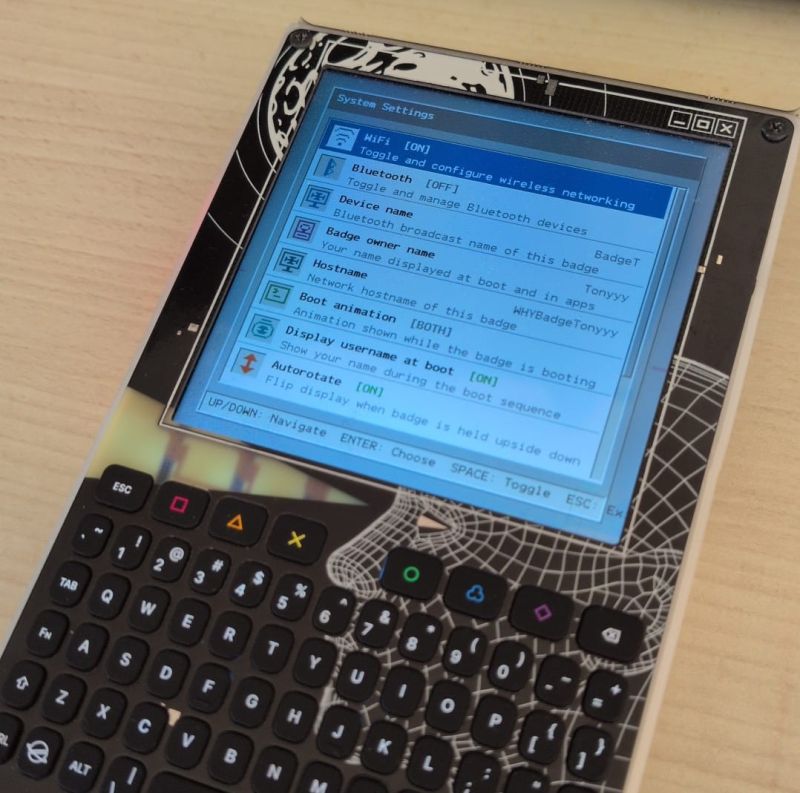
- Device name. The badge now carries a human-readable name for Bluetooth connections instead of a faceless MAC. It's used as the Bluetooth display name and surfaces in the launcher config so the rest of the system can read it consistently.
- Badge owner name. As the badge owner you can set your name, which can then be displayed in the boot animation. As this is also stored in the launcher config the goal was to allow other apps to also use your name, for example for a messaging app.
- Hostname. When a badge connects to WiFi the hostname can be used to name your personal device.
- Boot animations. A proper splash/animation on startup instead of a cold jump into the launcher. You can choose from two boot animations (or both after each other) consisting of a terminal like bootup, and/or the WHY logo mentioning that the users badge is booting up. When selecting both, you will first see the terminal output and then the WHY logo with the badge owner's name.
- Global autorotate. The badge has a Bosch BMI270 6-axis IMU on the I2C bus, so the compositor can rotate the whole display to match how you're holding it. This was already implemented into the nametag app, but having this functionality everywhere in the badge seemed to be essential as when walking around you have the badge hanging upside down on your chest. This is also the feature whose config-read code produced the
fseekcrash mentioned earlier. - MAC address randomization. With this it is possible to use random MAC addresses (after the first reboot) when connecting to WiFi networks. This functionality is normally implemented in phones and PCs for example to protect the users privacy by creating a temporary identifier for each WiFi network, which I thought was also cool to add to a badge.
- Pixel-style app icons. To give each app (and settings entry) their own look and feel they have now a pixel-style icons (see Image 2).
- Folders in BadgeVMS launcher. To avoid having a huge list of apps in the launcher to scroll through each time, it is possible to define folders for apps to group them by.
- Reorder apps. In the settings there is a
Reorder appsentry which allows you to move apps in and out of folders. These changes also persist on reboot. - Default app toggle and selection. Especially for conferences it can be useful to directly boot into a selected app. In the settings you can select an app and after rebooting it will launch directly into that app instead of going to the BadgeVMS launcher first. If you have a boot animation enabled, it will show that before launching the default app.
- Detailed About page, which now contains the hardware specs, so you can easily show that to other people instead of having to remember all of it.
Aside from these features I have also implemented some minor layout fixes and usability related features such as going back to the top of the list when you reach the bottom.
Bluetooth Low Energy
The ESP32-C6 already handles WiFi for the badge, and it's the same radio that does Bluetooth, so BLE 5.3 was possible but just not yet implemented. For this to work I brought up the NimBLE stack on the C6 and bridged it to the P4 through the existing esp-hosted layer, so WiFi and BLE run simultaneously on the one chip.
Two things to do with it:
-
Wireless keyboards. The badge pairs with any standard BLE HID keyboard using just-works pairing (no PIN). Once paired, keypresses from the wireless keyboard are indistinguishable from the physical badge keyboard, the same key events reach whatever app is in focus, and the app has no idea whether input arrived over a wire or over the air. Paired keyboards are remembered and can reconnect automatically.
-
Badge-to-badge messaging. Every badge continuously advertises itself by name while Bluetooth is on, so nearby badges show up in each other's scans with zero setup. The goal for this in the future would be to connect two of them so they can exchange short UTF-8 text messages (up to 512 bytes). This however is not yet implemented.
To manage these Bluetooth settings there is a dedicated Bluetooth section in the settings app, split into three:
- Bluetooth functionality can be toggled on/off in general. Using the
config.jsonfile you can also set it on your PC before flashing. - Identity: the badge's BT name (e.g.
WHY2025-A3F2, derived from the BT MAC by default) can be changed using the 'Device name' settings entry. The name is editable via a text dialog. - Devices: when Bluetooth is turned on you can see the BT MAC addresses of all Bluetooth Low Energy devices around you. To connect just simply select that device and it will try to pair.
Everything that should survive a reboot lives in NVS (flash): the enabled flag, the badge's BT name, and the paired-device list (address, name, and type, up to 16 devices).
The LED-MATRIX add-on
Back at camp I picked up a LED-MATRIX v1.0 add-on, and the obvious move was to turn it into a badge-controlled LED scroller, so we had to write the driver and an app for it. The hardware is a 12×20 LED matrix driven by an NXP PCA9698 40-bit I2C I/O expander. A few things worth knowing:
- The "0x40" silkscreened on the PCB is the 8-bit write address; in the 7-bit notation ESP-IDF actually uses, the chip lives at 0x20 (all address pins grounded).
- 12 rows are anodes (active HIGH), 20 columns are cathodes (active LOW). A LED lights only when its row is HIGH and its column is LOW at the same instant.
- The matrix is multiplexed, which means that you can only light one row at a time. So the firmware has to cycle through all 12 rows continuously at well over 1 kHz or nothing looks lit.
On the software side there is a new kernel driver, badgevms/drivers/pca9698.c, that registers the panel as the device LEDMATRIX0 and writes all five output-bank registers in a single auto-increment I2C transaction. On top of that sits an SDL3 app, sdk_apps/led_matrix_v1, with three modes: static (up to four 5×7-font characters), scroll (text marches left at 1 px / 50 ms), and diag (an I2C bus scan plus 36 hardware test patterns). A background thread holds a uint8_t[12][20] framebuffer and multiplexes it onto the panel under a mutex while the main thread updates pixels.
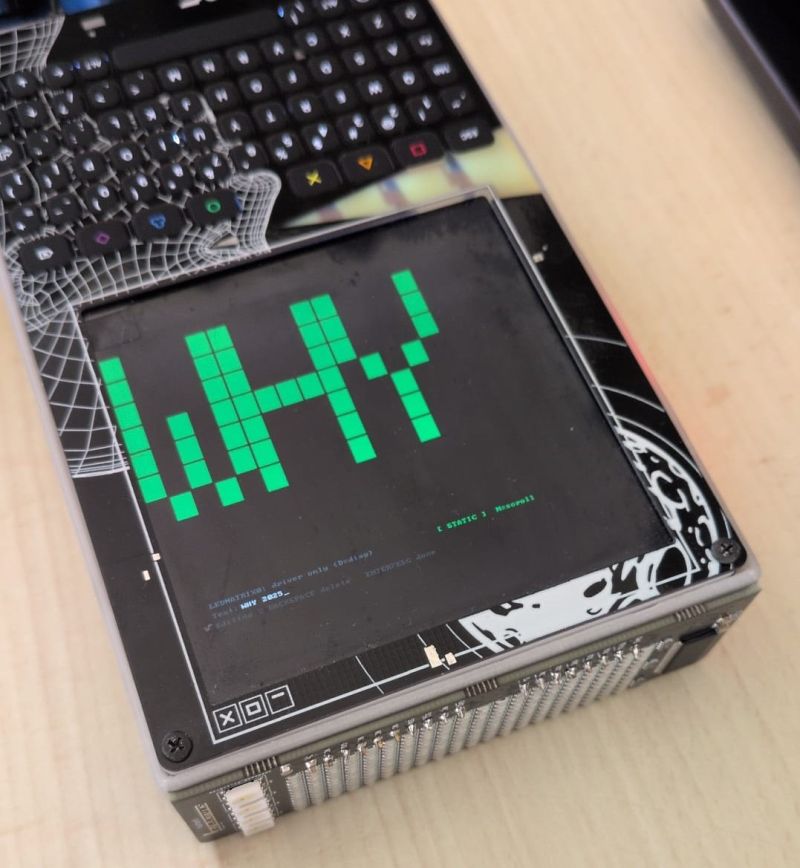
And then... it didn't light up.
After going through the hardware wiring documentation of the addon and the WHY badge itself, the culprit turned out to be the addon hardware, not the software. The PCA9698 has an active-low /RESET pin, which means that if it's held at 0 V, the chip is frozen and ignores I2C at every address. The badge exposes a CRESET signal on the add-on header, but on this add-on it's wired to NC (not connected). So whether /RESET floats high depends entirely on a pull-up the add-on PCB doesn't have. The fix should be to solder a 10 kΩ resistor from the PCA9698's /RESET (pin 25 on the HVQFN48 package) to 3.3 V. So the driver works, the app works, and the matrix is one resistor away from working.
Next up
That's the foundation: a current firmware build, BLE for keyboards and badge chat, and an LED-matrix driver.
In Part 2 the ESP32-P4 processor is pushed to its limits by porting Game Boy, Sega Master System, and NES emulators. I also mention the badge-to-badge OTA system concept that lets newer badges hand updates to older ones over an open WiFi network, no PC or internet required.
If you want to flash this customized firmware to your own WHY2025 badge you can find it here: github.com/Tonemon/BadgeVMS. Again, flashing can be done the same way as if you would flash the original Team:Badge BadgeVMS project.