Reviving the WHY2025 Badge, part 2: Emulators & Badge-to-Badge OTA
Series
In Part 1 of this series I brought BadgeVMS up to a newer ESP-IDF build, survived the porting crashes, added Quality-of-life features, Bluetooth Low Energy and an LED-matrix driver to the WHY2025 badge. This part is about pushing the badge. First I tested the ESP32-P4 processor by running various console emulators on it, then I build a system that lets one badge update another over the air with no PC or internet involved. As before, all of the sourcecode can be found here: github.com/Tonemon/BadgeVMS.
Pushing the CPU with console emulation
The badge has a 400 MHz RISC-V core and 32 MB of PSRAM. It seems to be enough to emulate a console with so I ported three different emulators: Game Boy / Game Boy Color (via peanut-gb), Sega Master System (via TotalSMS), and NES (via nofrendo, the retro-go fork). All three run real ROMs off the SD card.
Picking cores that fit a PIC ELF world
Choosing the emulator cores was less about accuracy and more about how the code is shaped, because BadgeVMS apps are position-independent ELF shared objects. Cores with large global/static state generate a pile of GOT entries and relocations and bloat the ELF. This is because position-independent code can't hardcode addresses and every global is reached through the Global Offset Table. This is a slot the loader has to patch at launch (a relocation) and that the code has to read through on every access (an extra memory load). Cores built around a single heap-allocated state struct are therefore the most useful and thats why I picked the following:
| System | Core | Licence | Reason |
|---|---|---|---|
| NES | nofrendo (retro-go fork) | GPLv2 | ~10 KB of singleton BSS, 63 mappers, already runs NES at 60 fps on an ESP32-C3 RISC-V core. |
| GB / GBC | peanut-gb | MIT | Zero globals, all state in one struct gb_s; native GBC; audio compiles out entirely |
| SMS | TotalSMS | MIT | Zero globals, one SMS_Core struct, ~60–80 KB; ran on the MCH2022 badge at 60 fps |
The badge has no audio hardware, which actually simplified things. peanut-gb and TotalSMS let you omit audio at compile time, and nofrendo's APU just never gets called. My full research notes on the alternatives (gnuboy, InfoNES, smsplus-gx and friends) are in the emulator core docs.
The architecture: launchers + emulators
Rather than one monolithic emulator, each system consists of two apps: a launcher that browses ROMs and an emulator that plays one. The launcher scans its ROM directory (SD0:[ROMS.NES], SD0:[ROMS.GB], SD0:[ROMS.SMS]), shows a scrollable list, and then process_creates the emulator with the chosen ROM path as argv[1], then wait()s for it to exit.
That argv[1] contract makes the emulators trivially composable. The additional "Start Random Game" app that was implemented as well needs zero changes to any emulator as it just scans all three ROM folders, picks one, and launches the right emulator with the path. The launchers also share a single rom_browser.c component so the list UI exists once.
For video, every emulator opens a 720×720 fullscreen window but renders into a native-resolution framebuffer (256×240 for NES, 160×144 for GB, 256×192 for SMS). The ESP32-P4's PPA hardware scaler upscales that to the screen, which is the same approach the badge's Doom port uses. Input is mapped so arrow keys / WASD are the D-pad, Z/X are A/B, Enter is Start, and ESC quits back to the launcher.
So about the performance...
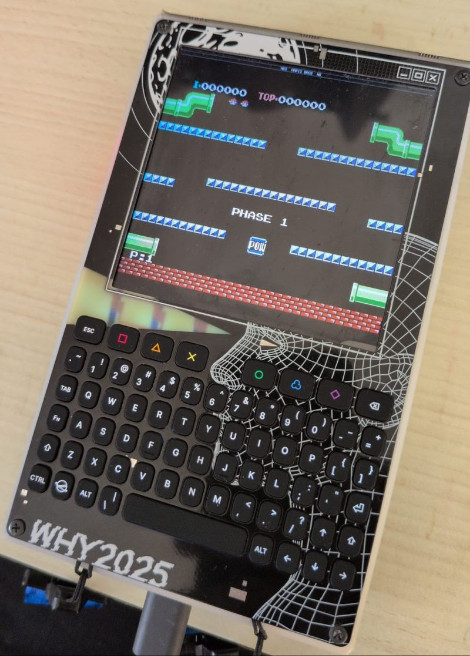
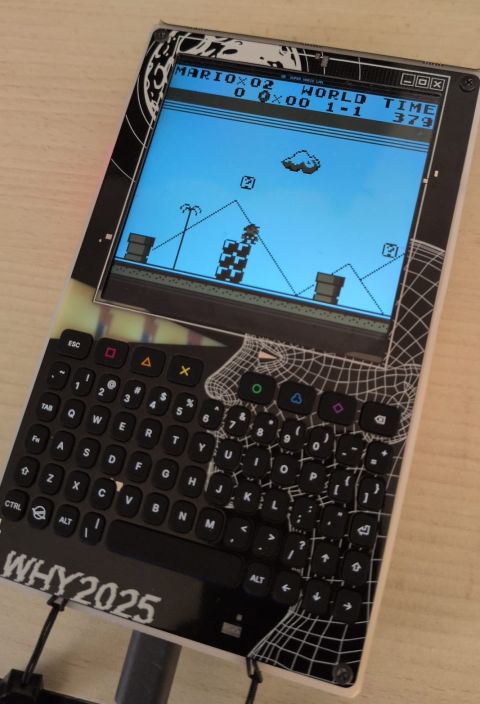
Out of the box it was pretty rough. The ROMs on the heavier side were able to run at roughly one frame every three seconds, and most lighter ROMs at maybe 3 fps. This does not allow you to play all of your ROMs seemlessly, but the pixel-style ROM games still look cool on the badge (see Images 1 and 2). Some of the optimizations that helped to get to this point were:
-O3on all three emulator targets, plusNDEBUGto strip the per-opcodeassert()calls sitting in the hottest loops.- Computed-goto dispatch tables for the CPU cores.
- Frame-skipping that actually skips work. The trick is skipping the parts of the rendering, not just the present: NES passes a
drawflag down into the PPU so it skips pixel writes on alternate frames.
The wall you can't optimize past
There's a hard ceiling here as ELF apps run entirely out of SPIRAM. The P4 has a 256 KB L2 cache, but an emulator's working set (CPU execute loop + ROM banking windows + framebuffer) doesn't fit in it, so there are constantly cache misses at ~70–150 cycles each on an in-order core. The practical ceiling for any of these emulators under the current ELF-loader architecture is around 15–20 fps, but on the badge we are currently unable to reach that. In theory, to reach 30+ in such emulators would mean placing hot code and data in internal SRAM, which the ELF loader can't currently do.
So it runs Game Boy and NES versions of Mario for example, but really slowly and mostly for show.
The Badge-to-badge OTA functionality
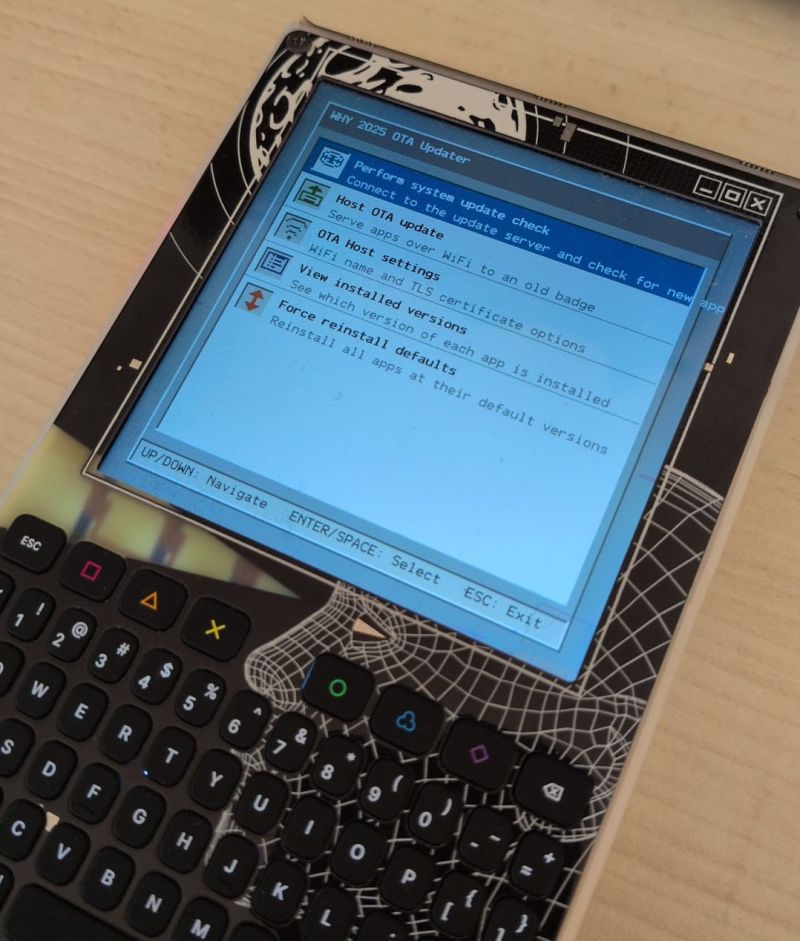
The last functionality that I wanted to implement specifically for conferences is the Over-The-Air updates that travel badge-to-badge. The idea is that someone with a badge running a newer customized BadgeVMS OS version can host an open WiFi network (for older badges this would be the WHY2025-open network that was also at camp), and people with older badges could connect and pull the newer apps directly, with no laptop and no internet required.
Pretending to be the update server
The hosting badge starts up a little self-contained network and impersonates the official BadgeHub API with the following components:
- WiFi soft-AP. An open network called
WHY2025-openis being broadcasted with the IP address range192.168.4.0/24. It usesWIFI_MODE_APSTA, so an existing client WiFi connection survives if there's no upstream WiFi at all, making sure that the hosting still works in complete isolation. - DHCP. lwIP's built-in server hands clients an address and is able to advertise the Badge itself as the DNS server.
- DNS interception. A tiny UDP server on port 53 answers exactly one name,
badge.why2025.org, with192.168.4.1, andNXDOMAINfor everything else. The theory is to leave the old badge's updater completely unmodified with it thinking that it's talking to the real BadgeHub as it's still looking forbadge.why2025.org. - local HTTP server. A single-threaded HTTP/1.0 server on port 80 emulates the BadgeHub v3 API (
/api/v3/ping,project-summaries,project-latest-revisions/{slug}, the revision JSON, and the file endpoints), serving each installed app's ELF andversion.txtstraight out of the VFS of the badge with the newer BadgeVMS/apps.
So from the old badge's point of view, it connects to WiFi, resolves the update host, and downloads apps exactly as it would from the internet, except the "internet" is the newer badge. The end-to-end design is in ota-hosting-architecture.md.
The self-signed-certificate problem
The main problem causing this setup to not work is the fact that the old badges' updater app has https:// hardcoded and refuses self-signed SSL certificates. So a badge with a newer OS can't just serve plain HTTP to them, and it can't serve HTTPS with a valid BadgeHub SSL certificate either as we don't have a valid certificate (that could be generated with the Team Badge private key).
The workaround is a bit of a sidestep: sideload a patched OTA client app (called TheNewImprovedGalacticPatcher) onto the old badge from an SD card first. It's the same updater app, rebuilt with SSL verification turned off (ssl_verify_peer = false, cert-bundle detached, common-name check skipped). As the badge loads any app from SD card as well, we can simply turn the badge on and it will appear in the applications overview. Once that patched client is running, the old badge happily talks to the host badge and pulls the real update, including eventually a properly-signed-or-plain newer updater.
Two major bugs
Hosting a TLS server inside a userspace app on a badge OS turned up some major heap and memory bugs that took a long time to investigate with almost no debugging information:
A
printfbetween twofree()s took down the TLS server. Freeing the 311-byte certificate buffer inserted it into dlmalloc's large-chunk tree, writing tree pointers into the freed block. The very nextprintf(BadgeVMS's printf allocates internally) reused that exact block and overwrote those pointers with the format string. The fix: hand buffer ownership to the TLS context and free each one immediately after mbedTLS copies it, with no allocation in between. Full autopsy.
0x0000BAD0code corrupted into an illegal instruction. The badge kept crashing with an "Illegal instruction" whose faulting bytes were0x0000BAD0, which on RISC-V decodes toC.FSD, a double-precision float store the P4 doesn't implement. Something was overwriting the first instruction of a live function in PSRAM. The main culprit turned out to be a sign bug inwhy_sbrk's heap-trim path that freed almost the entire app heap instead of a few trailing bytes, so pages of live code got recycled. The hunt that found it is documented in ota-hosting-psram-dma-crash.md.